
Your user manual
Busy Fox · Printer help
Phomemo D520BT user guide
Connect your printer, print shipping labels and solve label feeding or print quality problems.
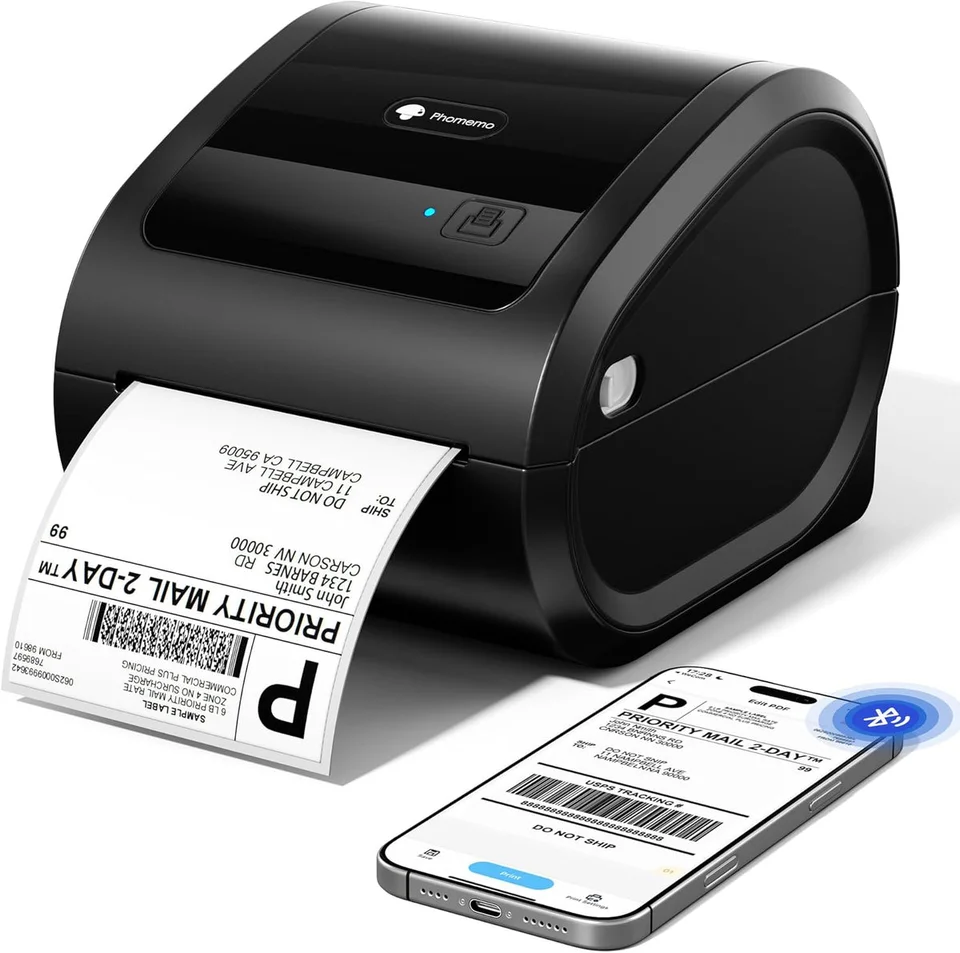
Phomemo D520BT
Your mobile app
Labelife
See how it’s done
Set up gap labels on your D520BT
Import and print a PDF
Labelife · phone
Print 4 × 4, 4 × 6 and 4 × 8 inch labels
Labelife · computer
Set up black mark labels on your D520BT
Crop a PDF
Labelife · computer
Crop Amazon FNSKU labels on desktop
Labelife · computer
Crop Amazon shipping labels on desktop
Labelife · computer
Print LTL or FNSKU PDFs from your phone
Labelife · phone
Crop a PDF on your phone
Labelife · phone
Crop and print a shipping label in ChromeOS
Labelife · ChromeOS
Add text, shapes, lines and borders
Labelife · computer
Add an image to your label
Labelife · computer
Create a barcode or QR code
Labelife · computer
Align items on a label
Labelife · computer
Add a date or time
Labelife · computer
Adjust print settings in Labelife
Labelife · computer
Share a file from Labelife
Labelife · phone
Make barcodes clearer in Labelife
Labelife · phone
Restore your D520BT to factory settings
Print a D520BT test page
Set up Labelife for ChromeOS
Labelife · ChromeOS
Print a batch of labels with Excel
Labelife · computer
Save designs and find print history in Labelife
Labelife · computer
Import several PDFs
Labelife · phone
Install the D520BT driver and set up printing on a Mac
Driver · macOS · USB
The video shows an older macOS interface.
Connect your D520BT via Bluetooth on Windows
Labelife · Windows · Bluetooth
The video shows an older Labelife interface.
Clean the printhead
The video shows a PM241-BT. The cleaning steps also apply to the D520BT.
What do you need help with?
Setup & connection
Which app should I use?
Use Labelife on your Android phone, iPhone or iPad. Switch on the D520BT and connect from within the app.
On Windows, you can print from Labelife via Bluetooth or USB. On a Mac, use USB. For USB printing, install the Phomemo driver for your model and operating system. Follow the instructions below for your chosen connection.
Where can I get the driver?
Open the Phomemo download page using the link with this answer. Select D520BT and download the driver for Windows or Mac, matching your computer. Install that driver before adding the printer to your computer.
How do I connect my phone?
Turn on the printer and Bluetooth, then connect inside Labelife. Do not pair through the phone’s Bluetooth settings.
Why can Labelife not find my printer on my phone?
- Turn on the D520BT and keep your phone nearby.
- Turn on Bluetooth and allow Labelife to use it in your phone settings. On Android, check location access if requested.
- On Android, is the printer already listed as a paired device in the Bluetooth settings? Remove that pairing.
- Search for the printer inside Labelife, rather than pairing it in your phone’s Bluetooth settings.
- If the printer does not appear, restart the printer and phone, then search again inside Labelife.
If the printer still does not appear, send us your phone model, operating system, Labelife version and a screenshot of the message. Tell us whether the printer appears in your phone’s Bluetooth settings.
Labels & loading
Does the printer need ink or toner?
No. It prints using heat-sensitive labels, so there is no ink or toner cartridge.
Can I print in full colour?
No. Standard thermal labels produce monochrome output. Colored label stock can provide a coloured background.
How do I load the paper roll?
- Open the cover and fit the label roll onto the removable holder. Place it in the compartment with the printing side facing up at the outlet.
- Adjust the guides so the labels run straight without being pinched. Pull the label end through the outlet.
- Close both sides of the cover. Run label recognition for the type of labels you loaded.
Which way should the labels face?
Use thermal labels with the printing side facing up. Close both sides of the cover firmly.
How do I calibrate labels separated by gaps?
With straight labels loaded and the printer in blue-light standby, hold Feed until the light turns purple, then release.
How do I calibrate black mark labels?
Load the labels and switch off. Hold Feed while switching on, then release immediately when the red light turns blue.
Where should I place the external label holder?
Place it directly behind the label inlet on a level surface. Keep the backing in a straight line with the printer’s guides and leave room for the roll to turn or stack to unfold without catching.
Why does a thermal label fade or turn darker after printing?
Thermal labels can change colour when exposed to heat, sunlight or moisture. Store spare rolls in their closed packaging in a cool, dry place away from direct sunlight. Keep printed labels away from strong heat and prolonged moisture. For shipping labels, keep packing tape off the printed area; contact with tape can affect the thermal coating. Changing print darkness does not prevent damage caused by storage or use.
Designing & printing
How do I print my own sticker design?
- Load compatible thermal labels and connect the printer in Labelife.
- Create a label with the same shape and dimensions as the labels you loaded. Add your text or image and keep the design inside the label outline.
- Check the print preview and print one label. Adjust the layout if any part is cut off before printing the rest.
How do I print a shipping label from my sales platform?
- Download the shipping label as a PDF from your sales platform.
- Open it in Labelife, or print it from a PDF program on your computer with the matching printer driver.
- Set the paper size to match the labels you loaded. For 4 × 6 inch labels, use 101.6 × 152.4 mm.
- Check that the full address and barcode fit on one label in the preview, then print one label.
Why does my shipping label come out tiny?
Download your shipping label as a 4 × 6 inch PDF (101.6 × 152.4 mm), if your platform offers that format. Shrinking a whole A4 page can make the address and barcode too small. If the label is part of an A4 document, crop it:
- Import the PDF into Labelife on your phone or computer and open the cropping tool.
- Set the crop frame around the complete shipping label. Keep the address, barcode and surrounding space inside the frame.
- Match the paper size to the labels in your printer. For 4 × 6 inch labels, use 101.6 × 152.4 mm.
- Check that the complete label fits on one label in the print preview. Print one test label and check the address and barcode before printing the rest.
The video below shows cropping on your computer. The additional instructions also show the steps on your phone.
How do I switch from shipping labels to 50.8 mm round labels?
Use a 50.8 × 50.8 mm document or the 2 inch round preset, and set the same paper size in the printer settings. A 50 mm template is a different size. Check the orientation and keep artwork inside the circular edge. Let the printer detect the loaded labels. Changing the roll alone does not change a saved 4 × 6 inch shipping-label layout.
Print quality & problems
What should I check if the printer will not turn on?
Check the outlet, adapter and printer plugs. Confirm the power switch is on and the adapter’s indicator is lit.
What can I try if a printed barcode will not scan?
Check that the complete barcode appears in the print preview and on the label. Use the original label file at its intended size; avoid shrinking a whole A4 page onto a small label. In the Labelife phone app, try Print Quality 4 and Print Speed 2, then print and scan one test label. These are starting settings for that app, not values to copy into every computer driver. If it still will not scan, send us the source file, a photo of the print and your settings.
Why does Labelife report a paper jam?
- Switch off the printer and check for folded or trapped labels. Reload them straight, printing side up, and close both sides of the cover.
- Match the paper size and type in Labelife to the loaded labels.
- Switch on and follow the linked calibration instructions for gaps or black marks, according to your labels.
If the warning remains, follow the linked printhead-cleaning instructions. Let it dry completely before printing again.
Why is the red light flashing?
A flashing red light can indicate a paper jam or dirt affecting paper detection.
- Switch off the printer. Check for folded or trapped labels, reload them straight with the printing side facing up and close both sides of the cover.
- Match the paper size and type in your print settings to the loaded labels. Switch on the printer and follow the linked label-recognition instructions for gaps or black marks.
- If the light keeps flashing, follow the linked cleaning instructions and let the printhead dry completely before trying again.
Still flashing? Contact us with a short video of the light and label feed.
Why does the printer skip labels or print in the wrong position?
Check that the paper size matches the loaded labels and run label recognition for your paper type.
If you print through the Windows driver and the label position is still wrong:
- Open Printers & scanners in Windows and select D520BT.
- Open Printing preferences. Under Option, set Post-Print to Tear off.
- Save the setting, restart the printer and run label recognition again. Print one test label.
This is a Windows driver setting; it does not apply when printing from your phone.
How do I restore factory settings?
- With the printer switched off, hold Feed while switching on the D520BT. Release after the red light flashes five times.
- Check that the paper size in your print settings matches the loaded labels.
- Print one test label and check that the full design is in the right position.
Why do my labels come out blank?
- Check that you are using thermal labels with the printable side facing up. The instructions below show how to load the roll.
- Check that the text or image appears in the print preview. If the preview is empty, check your file and layout first.
- Check that the original power adapter is properly connected.
- Print a self-test page using the instructions or video below. If that print is clear but your own label stays blank, check the source file and print settings.
If the self-test is also blank, send us photos of the loaded labels, the self-test and the power adapter label, along with your order number.
How do I check a faint or unclear print?
Print a self-test first: press the paper-feed button twice quickly. Compare it with your label. If only the label looks wrong, check the source file and print settings. If the self-test is also faint, check the original power adapter, follow the linked printhead-cleaning steps below and try fresh white thermal labels if you have some. In Labelife on your phone, Print opens the Print Quality and Print Speed settings. Change one setting at a time and compare one test print.
If you have no spare labels or the print remains unclear, see below for the details you can send us.
Where can I adjust print darkness and speed?
On your phone: open Print in Labelife. Use Print Quality for darkness and Print Speed for speed.
On Windows: open the printer’s Printing preferences. Use Density for darkness and Print Speed for speed.
On Mac: open the print dialog in Preview and choose Printer Functions. Use Darkness and Print Speed.
Menu names can vary by driver version. Change one setting at a time and compare one test label. The app and driver may use different scales, so do not copy numeric settings between them.
How do I print a self-test page?
Press the paper-feed button twice quickly. Keep the resulting page to help diagnose print-quality problems.
Why does Labelife still report the wrong paper?
Check that Labelife has the D520BT selected and that the label dimensions and paper type match the loaded material. Reconnect the printer and run label recognition for that paper type. Check for an app update if your material type is unavailable. Do not start by deleting the app: save or export any designs you want to keep before reinstalling. If the message remains, send us the exact wording, your Labelife version and a photo of the labels and backing.
Using Labelife on your phone? Find the app version under Setting → About Labelife.
What should I send support if print quality stays poor?
Send us a photo of a self-test print, your print speed and darkness settings, and the details on your power adapter. Use the links below to print the self-test and find the settings. A screenshot of your print settings is fine; you do not need to copy the values.
What should I check if my label has white streaks or missing parts?
- Check whether the missing part is already absent from the print preview. If so, check the document size and layout first.
- Match the paper size and type in Labelife to the loaded labels.
- Check that the paper exit is clear; labels must not bunch up against an object. Switch off before removing an obstruction.
- If the preview is complete but parts of the print are missing, follow the linked printhead-cleaning instructions. Let the printhead dry completely before printing one test label.
If sections are still missing, send us the source file, a photo of the print and a video showing the printer’s indicator during printing.
Why does the printer stop or restart during printing?
Check that the original power adapter and its connections are secure. On the D520BT, the light going out and coming back on with a beep, then staying blue, indicates a restart. In Labelife on your phone, try reducing Print Speed to 2 and Print Quality to 4, then print one label. If it happens again, send us a video showing the indicator and paper movement, plus a photo of the power adapter label. If the printer keeps running but part of the design is missing, check the document and paper settings instead.
Why does the printer print an old label again?
Check the file name, recipient and print preview before sending another job. If the preview shows the old label, reopen the correct file first. If the preview is correct, remove unfinished jobs from the print queue.
On your phone: in Labelife, open Setting → Print List and cancel the old jobs.
On Windows: open the printer’s print queue in Printers & scanners and cancel the queued jobs.
On Mac: open System Settings → Printers & Scanners, select the printer, open its queue and cancel the old jobs.
Send one new label and check the printed address. If the old label returns, send us your app version and screenshots of the preview and queue.
Using Labelife on your phone? Find the app version under Setting → About Labelife.
Computer printing
How do I connect by USB on a Mac?
- Download and install the Mac driver for your D520BT from Phomemo’s driver download page. The driver-download question below links to it.
- Install Labelife from the App Store on your Mac.
- Switch on the printer and connect it to your Mac with a USB data cable.
- Open System Settings → Printers & Scanners and add the USB printer. In the software selection, choose Label Printer, then add it.
- Select the printer in Labelife, match the page size to your labels and print one test label.
Why did Labelife lose the USB connection after an update?
Save your design and close any older version of Labelife that is still running. Open the new version, unplug the USB data cable and reconnect it. Check that the printer is switched on and selected in Labelife. If it still does not connect, try another data cable or port and check the driver. Save or export your designs before considering a reinstall.
How do I save a Labelife design for later?
- On your computer, choose File → Save or Save as in Labelife. Save the design as an .aml file with a name and location you can find again.
- Open that .aml file to edit the design later. Export a PDF, PNG or JPG if you need a copy for printing in another program; it does not replace the editable design.
- Copy your saved files before moving computers or reinstalling software. Do not use print history as your only copy.
Why does Windows not recognize my printer over USB?
- Switch on the printer and connect it directly to your computer with a USB data cable.
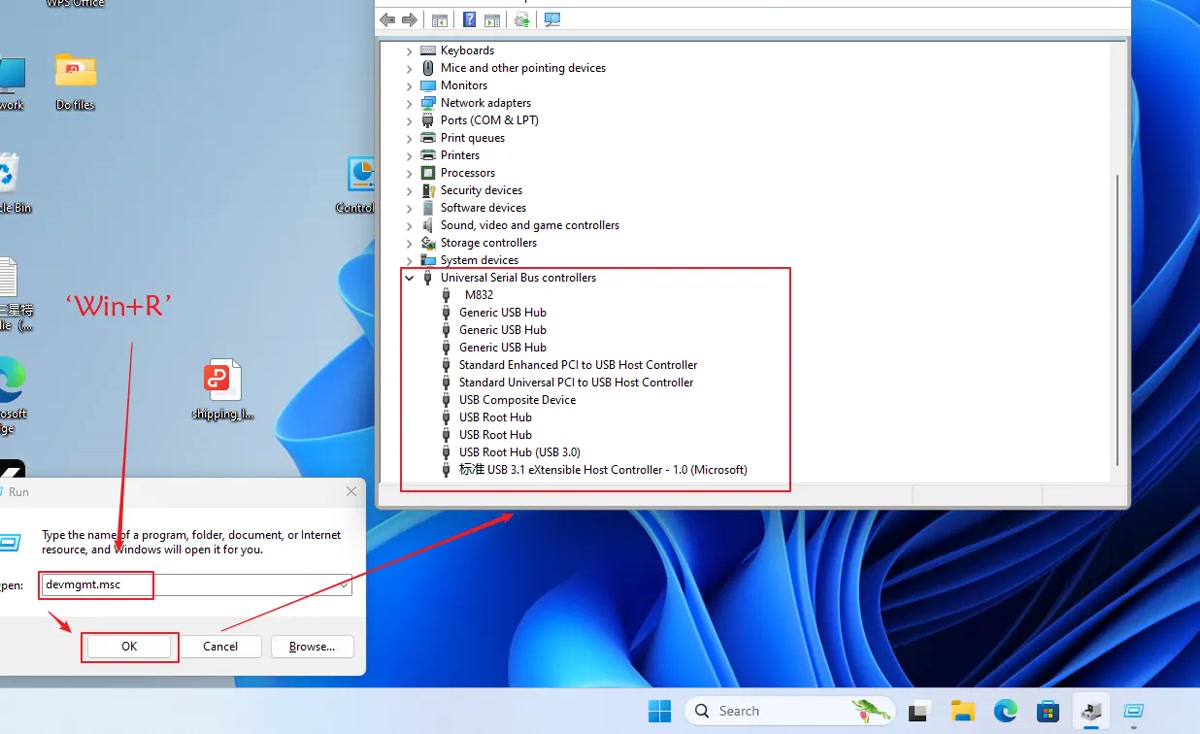
- Press Windows + R, enter devmgmt.msc and press Enter. In Device Manager, expand Universal Serial Bus controllers. Look for your printer or USB Printing Support.
- If it is missing, try another data cable and USB port without a hub or docking station.
- If Windows recognizes the printer, check the driver for your model and select the printer in Labelife.
The image shows an example of Device Manager; the printer name may differ. If it still fails, send us the error message and a Device Manager screenshot.
How do I connect the D520BT to Labelife via Bluetooth on Windows?
- Turn on the printer and Bluetooth on your computer. Open Labelife on Windows.
- Choose Add printer, then Wireless connection. Select your D520BT and click Connect.
- Check that the printer is connected in Labelife. Set your label size and print one test label.
The video shows an older Labelife interface; menu names may differ.
Printer missing or unable to connect?
- Check that Bluetooth is enabled in Windows. If you use a USB Bluetooth adapter, check that Windows recognises it.
- Remove any existing D520BT connection within Labelife, then search again through Add printer → Wireless connection.
- If it still fails, send us your Windows version, Labelife version and the error message. Using USB? Follow the USB instructions below.
My Mac blocks the driver installation. What should I do?
- Download the Mac driver for D520BT directly from Phomemo. The setup instructions below include the download link.
- Does macOS say the developer cannot be verified? Check where the file came from. If you trust its source, follow the Apple instructions below to allow only that file through System Settings → Privacy & Security → Open Anyway.
- Does macOS say the file is damaged or will harm your computer? Do not open it using an exception. Send us the exact message, your macOS version and the downloaded file name so we can help you choose the next step.
Care & power
How do I clean the printhead?
Switch off the printer, disconnect the power adapter and let the printhead cool. Open the cover and gently wipe the printhead with a 70% alcohol cleaning pad. Let it dry completely before closing the cover and reconnecting the power. Print one test label to check the result.
No matching answers. Try another word or browse the topics.
Printing from a computer?
Your computer uses different software from the mobile app.
Use Labelife for your shipping files. Connect via Bluetooth or USB on Windows, or USB on a Mac. For USB printing, install the Phomemo driver for your printer model and operating system.
Find the right driver.
Choose your printer model and operating system on Phomemo’s official download page.
Software & drivers at PhomemoAbout this guide and its sources
This guide brings together instructions and answers for your printer. You can consult the Phomemo brand documentation and original tutorials below. App screens and available features may vary by version.
Documentation & answers
- Which app should I use?
- Where can I get the driver?
- How do I connect my phone?
- Why can Labelife not find my printer on my phone?
- Can I print in full colour?
- How do I load the paper roll?
- Which way should the labels face?
- How do I calibrate labels separated by gaps?
- How do I print my own sticker design?
- What should I check if the printer will not turn on?
- What can I try if a printed barcode will not scan?
- Why does the printer skip labels or print in the wrong position?
- Why do my labels come out blank?
- How do I connect by USB on a Mac?
- Why does my shipping label come out tiny?
- What should I check if my label has white streaks or missing parts?
- Why does the printer print an old label again?
- Why did Labelife lose the USB connection after an update?
- Why does a thermal label fade or turn darker after printing?
- Why does Windows not recognize my printer over USB?
- My Mac blocks the driver installation. What should I do?
Original video tutorials
- Set up gap labels on your D520BT
- Import and print a PDF
- Print 4 × 4, 4 × 6 and 4 × 8 inch labels
- Set up black mark labels on your D520BT
- Crop a PDF
- Crop Amazon FNSKU labels on desktop
- Crop Amazon shipping labels on desktop
- Print LTL or FNSKU PDFs from your phone
- Crop a PDF on your phone
- Crop and print a shipping label in ChromeOS
- Add text, shapes, lines and borders
- Add an image to your label
- Create a barcode or QR code
- Align items on a label
- Add a date or time
- Adjust print settings in Labelife
- Share a file from Labelife
- Make barcodes clearer in Labelife
- Restore your D520BT to factory settings
- Print a D520BT test page
- Set up Labelife for ChromeOS
- Save designs and find print history in Labelife
- Import several PDFs
- Install the D520BT driver and set up printing on a Mac
- Connect your D520BT via Bluetooth on Windows
- Clean the printhead
Still need a hand?
Tell us your printer model, which app or computer you use, and what happens when you try.