
Your user manual
Busy Fox · Printer help
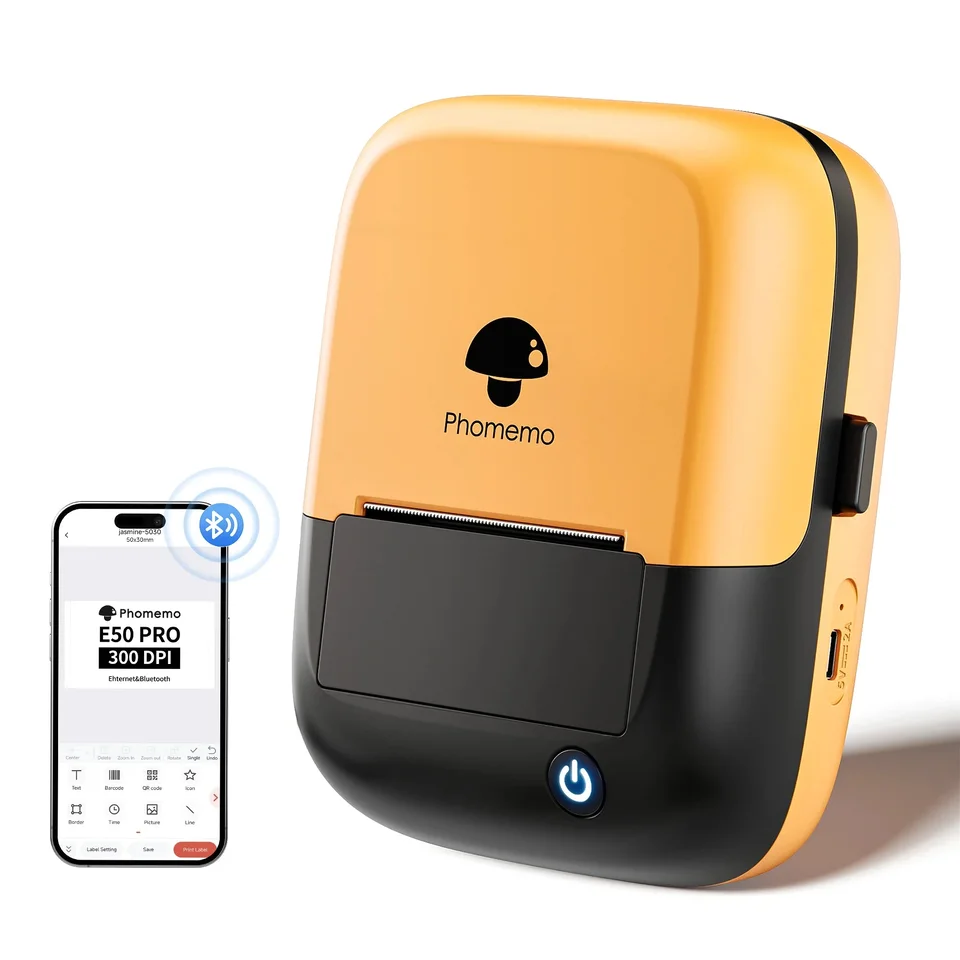
Phomemo E50Pro user guide
Set up your E50Pro, print labels and solve printing problems.
Phomemo E50Pro-OB
Your mobile app
Print Master
See how it’s done
Set up your E50Pro and print from your phone
Print Master · phone
Install the E50Pro Windows driver
Driver · Windows
Get started with Labelife on your computer
Labelife · computer
Print a batch of labels with Excel
Labelife · computer
Save designs and find print history in Labelife
Labelife · computer
What do you need help with?
Setup & connection
Why can Print Master not connect to my E50Pro?
Turn on the printer and keep it close to your phone. Open Print Master and choose Auto Connect or Tap to connect. Allow the requested Bluetooth access and select E50Pro if the app shows a device list. If you previously declined access, enable it in your phone settings and search again from inside Print Master.
Which app should I use on my phone?
Use Print Master on your phone. Install it from your phone’s app store. Printing from a computer? Follow the linked setup instructions for the driver and Labelife below.
How do I make my first label?
- Connect the E50Pro in Print Master and wait for the app to detect the label size.
- Choose Create New Label. Tap Text, enter your text and confirm.
- Tap Print Label and check the preview. Choose Print Now to print your first label.
Labels & ribbon
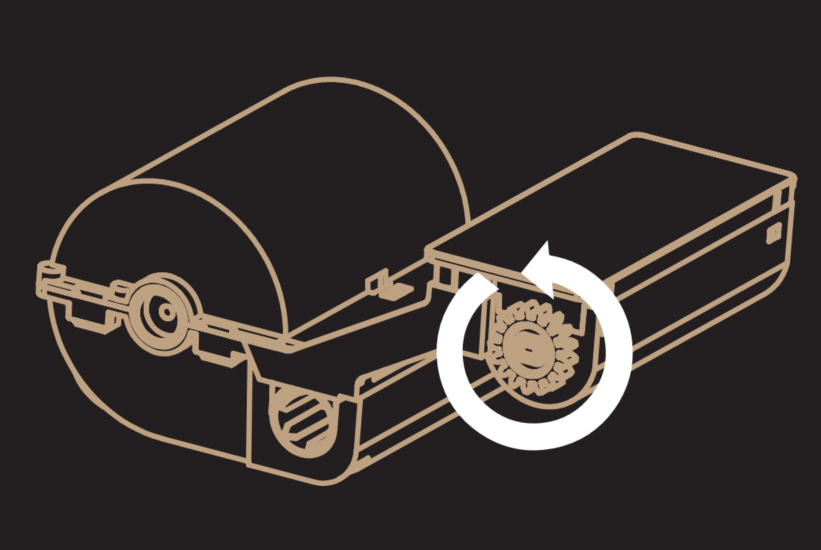
What if the carbon ribbon pulls out?
- Switch off the printer and remove the cartridge. Check the gears on top.
- Look at the illustration below. If the gears are present, turn in the illustrated direction to take up the loose carbon ribbon.
- Refit the cartridge. If a gear is missing or the ribbon keeps pulling out, stop printing and contact us with a photo of the cartridge.
Why is the label not feeding?
Switch off the printer and check that the cartridge is seated correctly. Guide the label end through the outlet and close the cover. Switch on and briefly press the power/feed button to feed the material. Still not feeding? Try another compatible cartridge if you have one. If you have no spare or the problem persists, send us a photo of the installed cartridge and a short video of what happens when you press the button.
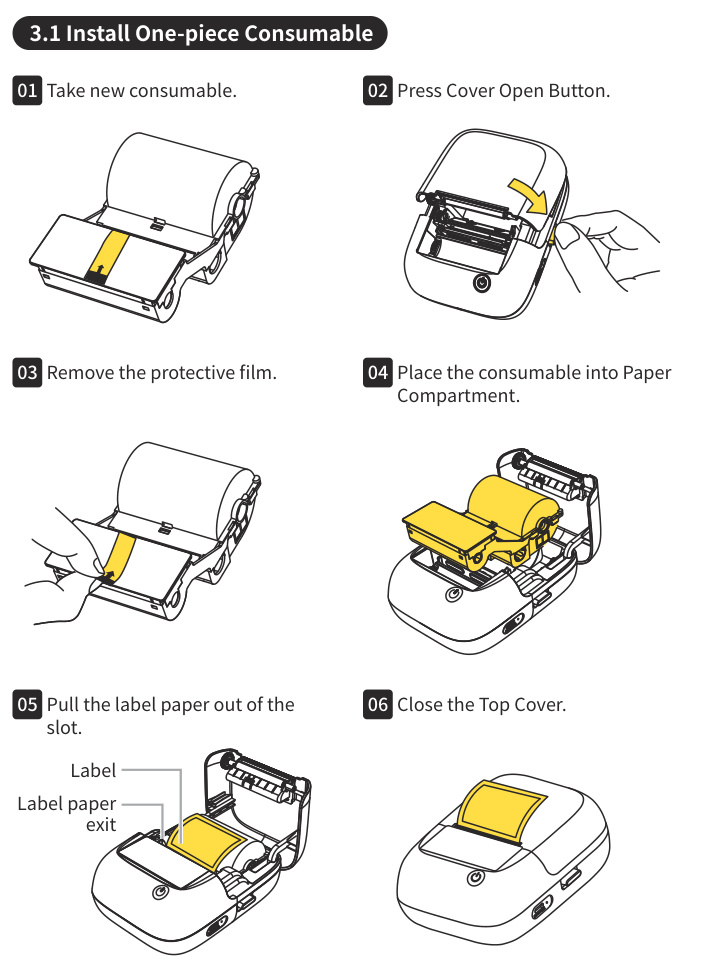
How do I load a new cartridge?
- Switch off the printer and press the cover release button. Remove the old cartridge.
- Unpack the new cartridge and remove its protective film. Place the cartridge in the compartment.
- Pull the label end through the outlet and close the cover.
- Hold the power/feed button for three seconds to switch on the printer. Press that button briefly to feed the material.
Designing & printing
How do I pause, resume or cancel printing?
Press the power/feed button once while printing to pause the job. Press it once again while paused to resume. To cancel the job instead, press the button twice while printing is paused. Use short presses; holding the button has a different function.
Why does Print Master ask for a subscription?
Print Master also offers paid app features. A subscription prompt relates to that offer, rather than a printer fault. Check the offer for the included features, price and subscription period.
Does the prompt appear when you try to do something? Send us a screenshot and your app version. Tell us what you want to do so we can help.
Print quality & problems
What should I check if the print is faint or unclear?
- Compare the source image and print preview with the print. If the preview is already blurry, use a sharper image.
- If the whole print is faint, charge the battery and check that the cartridge is seated properly.
- In Print Master, increase print density a little and compare one test label. Do not keep increasing density if letters or lines merge.
- Do you see white streaks or missing parts even though the print preview is complete? Check the printhead for dirt and follow the cleaning instructions below. Let the printhead dry completely before printing again.
- If you have another compatible cartridge, fit it correctly and compare the print.
If you have no spare or the problem persists, send us the source file, a photo of the print and your settings.
What does a red indicator light mean?
Slowly flashing red: the battery is below 20% and the printer is not charging.
Steady red: the battery is below 5% and the printer is not charging. Charge it before printing.
Rapidly flashing red: check for an open cover, missing material, a jam, overheating or a paused print job. Close the cover, check the cartridge and let a hot printer cool. If you deliberately paused printing, press the power/feed button once to resume.
Computer printing
How do I install the driver?
- Open the Phomemo download page using the link with this answer and select E50 PRO. Download the driver for your Windows computer or Mac.
- Switch on the printer and connect it with a USB data cable. Install the driver and Labelife.
- Select the E50Pro in Labelife and match the design size to the loaded material. Print one test label.
Why does Labelife not find my E50Pro?
- Switch on the E50Pro and connect it directly to the computer with a USB data cable. A charging-only cable cannot carry print data.
- Try another USB port or data cable.
- Install the E50 PRO driver for Windows or Mac from the Phomemo download page, then select the printer in Labelife.
If it still does not appear, send us your operating system, Labelife version and the exact message.
Can I use the E50Pro with a Mac?
Yes. Connect the E50Pro to your Mac with a USB data cable, install the Mac driver from Phomemo’s download page and use Labelife to design and print your labels. Select E50 PRO on the download page. For phone printing, use Print Master over Bluetooth.
How do I save a Labelife design for later?
- On your computer, choose File → Save or Save as in Labelife. Save the design as an .aml file with a name and location you can find again.
- Open that .aml file to edit the design later. Export a PDF, PNG or JPG if you need a copy for printing in another program; it does not replace the editable design.
- Copy your saved files before moving computers or reinstalling software. Do not use print history as your only copy.
My Mac blocks the driver installation. What should I do?
- Download the Mac driver for E50Pro directly from Phomemo. The setup instructions below include the download link.
- Does macOS say the developer cannot be verified? Check where the file came from. If you trust its source, follow the Apple instructions below to allow only that file through System Settings → Privacy & Security → Open Anyway.
- Does macOS say the file is damaged or will harm your computer? Do not open it using an exception. Send us the exact message, your macOS version and the downloaded file name so we can help you choose the next step.
Care & power
What should I check if the E50Pro will not charge?
- Use a 5 V, 2 A power adapter with a USB-A port and a USB-A-to-USB-C cable. Check both connections and try another cable if needed.
- Check the white indicator. Slow flashing means the printer is switched on and charging. Fast flashing means it is switched off and charging.
- Is the battery completely empty? Leave it charging for at least 20 minutes before trying to switch it on again. A full charge takes about 2–3 hours. Disconnect the charging cable before using the printer.
If the printer still does not respond, send us a photo of the adapter label. Tell us what the indicator does and how long you have charged the printer.
Should I print while charging from a power adapter?
When charging from a power adapter, let the E50Pro charge before using it. Printing during charging can slow charging and affect print quality. A full charge normally takes two to three hours. For printing from a computer, follow the separate USB setup instructions.
How do I clean the printhead?
- Switch off the printer, disconnect the cable and let the printhead cool for at least 30 minutes.
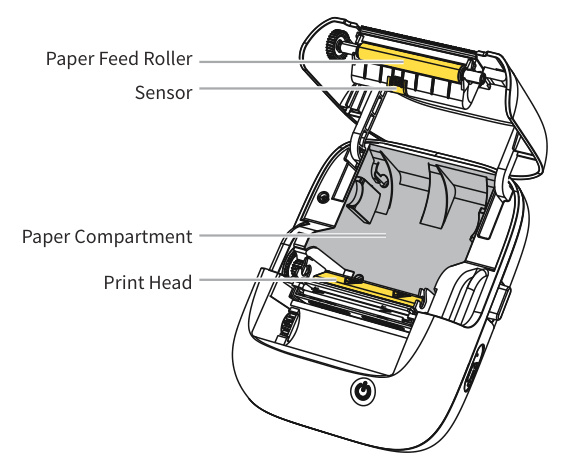
- Open the cover and remove the cartridge to reach the printhead. Keep your fingers away from the cutter.
- Gently wipe the printhead, especially the dark line, with an alcohol swab to remove dirt or residue.
- Let it air-dry completely before refitting the cartridge, closing the cover and printing one test label.
No matching answers. Try another word or browse the topics.
Printing from a computer?
Your computer uses different software from the mobile app.
WindowsmacOS
Labelife for desktop.
Connect the E50Pro with a USB data cable and install the Windows or macOS driver from Phomemo’s download page. Use Labelife to design and print labels on your computer. For phone printing, use Print Master over Bluetooth.
Find the right driver.
Choose your printer model and operating system on Phomemo’s official download page.
Software & drivers at PhomemoAbout this guide and its sources
This guide brings together instructions and answers for your printer. You can consult the Phomemo brand documentation and original tutorials below. App screens and available features may vary by version.
Documentation & answers
Still need a hand?
Tell us your printer model, which app or computer you use, and what happens when you try.