
Your user manual
Busy Fox · Printer help
Phomemo A30 user guide
Load a ribbon cassette, create your design in Print Master and solve printing problems.
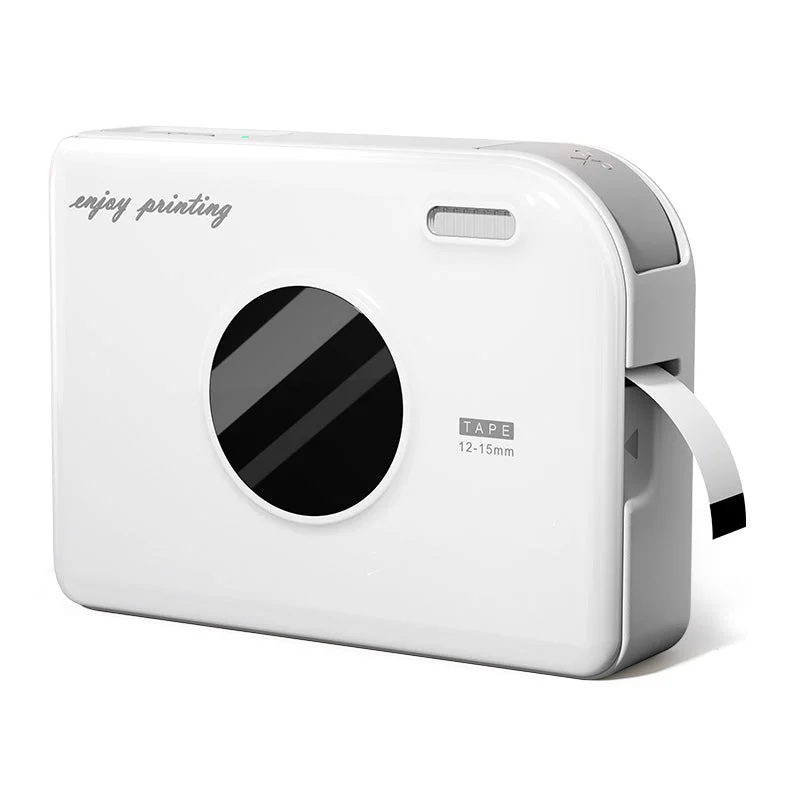
Phomemo A30
Your mobile app
Print Master
See how it’s done
Load the ribbon cartridge in your A30
Connect your A30 and print from your phone
Print Master · phone
Create your first label
Print Master · phone
Add and edit text
Print Master · phone
Choose a label template
Print Master · phone
Add icons and borders
Print Master · phone
Set up your A30 on Windows
Labelife · Windows
Set up your A30 on Mac
Labelife · macOS
Print a batch of labels with Excel
Labelife · computer
Save designs and find print history in Labelife
Labelife · computer
What do you need help with?
Setup & connection
Which app should I use?
Use Print Master on your phone. Turn on the A30 and connect to it inside the app. For printing from a computer, connect with the supplied USB data cable and use Labelife for Windows or Mac.
How do I turn it on?
Hold the power button for three seconds.
Why can Print Master not connect to my A30?
Hold the power button for three seconds and check the indicator. A steady green light means the printer is on. Open Print Master and allow the Bluetooth permissions it requests; check these in your phone settings if you previously declined them. Connect from inside the app. If the printer shows a steady red light, check the cartridge and let a hot printer cool before trying to print.
Ribbon & loading
How do I replace the cartridge?
- Hold the power button for three seconds to switch the printer off.
- Open the compartment below the ribbon exit and lift out the cartridge.
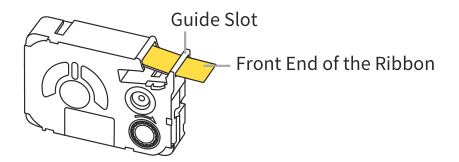
- Check that the new ribbon runs through its guide and is not folded or slack.
- Place the cartridge with the ribbon end facing the exit. Press it down evenly until the latch clicks into place, then close the cover.
Keep both the ribbon and the thin printing film clear of the printhead when inserting the cartridge.
What should I check if the ribbon jams?
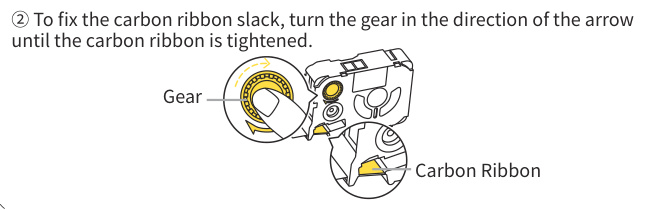
Switch off the A30 and remove the cartridge. Check that the ribbon runs through the guide without folds and is not caught on the printhead. The thin printing film inside the cartridge is separate from the ribbon you print on. Is the film slack? See the illustration below. Turn the take-up gear in the illustrated direction until the film is taut. Refit the cartridge until it clicks into place. Do not pull the ribbon while the printer is feeding it.
When should I position the labels after changing a cartridge?
For pre-cut labels, switch on the printer and press the power button once after loading the cartridge. This positions the label for printing. Continuous ribbon does not need this positioning step.
Designing & printing
How do I cut the ribbon or label?
Press the cutter after printing finishes. Leave enough blank ribbon at each end for a bow or attachment. Do not cut or tug at the ribbon while it is feeding.
How do I peel the backing from adhesive labels?
Turn the printed label over. If its backing has a split, gently bend the label along that split until you can lift an edge of the backing. Peel the backing away from the adhesive label. Do not tear the label itself. The linked manual shows this in section 04, step 8.
Why does Print Master ask for a subscription?
Print Master also offers paid app features. A subscription prompt relates to that offer, rather than a printer fault. Check the offer for the included features, price and subscription period.
Does the prompt appear when you try to do something? Send us a screenshot and your app version. Tell us what you want to do so we can help.
Print quality & problems
What does a steady red light mean?
A steady red light indicates an error such as missing material or overheating. Check that the cartridge is fitted and still contains material. If the printer has become hot, switch it off and let it cool before trying again. A rapidly flashing red light means it is preparing to switch off; that is a different indication.
Why does my ribbon or label come out blank?
Switch off the A30 and check the cartridge. Both the ribbon and thin printing film must run correctly through the guide. If the film is slack, follow the instructions below to tighten it. Refit the cartridge until it clicks into place and print one test piece.
What should I check if the print is streaky or blurry?
Switch off the printer and let the printhead cool. Remove the cartridge and check for dirt. Gently clean a dirty printhead with a cotton swab moistened with alcohol. Let it dry, refit the cartridge and print one test piece. If the print is still blurry, try another compatible cartridge if you have one. Otherwise, send us a photo of the print.
Computer printing
How do I print from a computer?
- Hold the power button for three seconds to switch on the A30. Connect it to your computer with the supplied USB data cable.
- Open the A30 software page using the link below and choose the instructions for Windows or macOS. Install Labelife as shown there.
- Select the connected printer in Labelife, match the material size and print one test label.
How do I save a Labelife design for later?
- On your computer, choose File → Save or Save as in Labelife. Save the design as an .aml file with a name and location you can find again.
- Open that .aml file to edit the design later. Export a PDF, PNG or JPG if you need a copy for printing in another program; it does not replace the editable design.
- Copy your saved files before moving computers or reinstalling software. Do not use print history as your only copy.
My Mac blocks the driver installation. What should I do?
- Download the Mac driver for A30 directly from Phomemo. The setup instructions below include the download link.
- Does macOS say the developer cannot be verified? Check where the file came from. If you trust its source, follow the Apple instructions below to allow only that file through System Settings → Privacy & Security → Open Anyway.
- Does macOS say the file is damaged or will harm your computer? Do not open it using an exception. Send us the exact message, your macOS version and the downloaded file name so we can help you choose the next step.
Care & power
Why does the green light flash while charging?
The A30 flashes green quickly when charging while switched off, and slowly when charging while switched on. A steady green light can mean the printer is on or the battery is charged.
Why does my A30 switch off by itself?
Does the A30 switch off after sitting idle? Check the automatic shutdown setting in the printer settings in Print Master. A low battery can also cause it to switch off. Charge it before printing again. If it keeps switching off during printing, tell us when this happens and which indicator light you see.
No matching answers. Try another word or browse the topics.
Printing from a computer?
Your computer uses different software from the mobile app.
WindowsmacOS
Labelife for desktop.
You can also print from a computer. Connect the A30 with a USB data cable and use Labelife.
Find the right driver.
Choose your printer model and operating system on Phomemo’s official download page.
Software & drivers at PhomemoAbout this guide and its sources
This guide brings together instructions and answers for your printer. You can consult the Phomemo brand documentation and original tutorials below. App screens and available features may vary by version.
Documentation & answers
Still need a hand?
Tell us your printer model, which app or computer you use, and what happens when you try.